


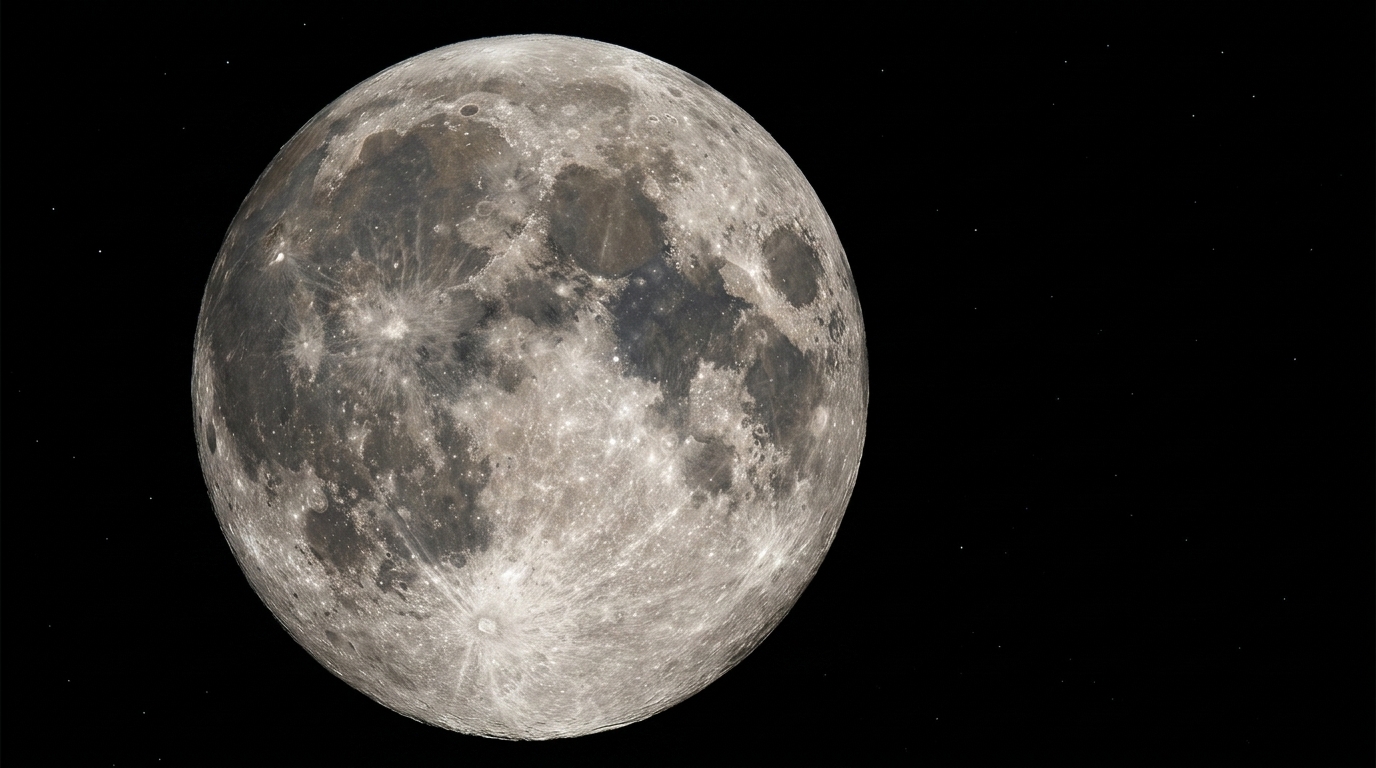
Quick Facts:
- Subject: The moon
- Best settings: The Looney 11 rule, f/11 at a shutter speed of 1 over your ISO
- Lens: A telephoto lens, 300mm minimum, 500mm or longer ideal
- Support: Tripod plus a remote or a 2-second timer
- Focus: Manual, on the terminator line
- File format: RAW
- Best time: A few days before or after a full moon
- Best for: Any camera with a manual mode, and even a phone
10 min read
In This Guide
- What You Need to Know
- Moon Settings at a Glance
- Gear and Lens
- Camera Settings and the Looney 11 Rule
- Focusing on the Moon
- Shooting the Moon on a Phone
- Why Your Moon Is a White Blob
- Full Moon vs. Crescent
- The Moon in a Landscape
- Common Mistakes to Avoid
- Sharper Detail With Stacking
- Displaying and Printing Your Shot
- Final Verdict
- Frequently Asked Questions
How to Photograph the Moon: What You Need to Know
Learning how to photograph the moon trips up more beginners than almost any other subject. You point the camera at a bright, detailed disc, press the shutter, and get back a featureless white dot in a black sky. The fix is simpler than most people expect. The moon is a sunlit rock, so you expose it like a daytime subject, not a night one.
This one idea solves most problems. Because the moon reflects full daylight, it needs a fast shutter and a small aperture, even though the sky around it looks pitch black. Once you treat it as a bright object, the craters, seas, and ridges appear with sharp contrast.
This guide walks through the gear, the exact settings, and the focus technique step by step. The steps for how to photograph the moon stay the same on a DSLR or a mirrorless body. You will also learn a phone method, the reason your shots overexpose, and how to time the phases for maximum texture. If the night sky pulls you in further, our beginner Milky Way photography guide is a natural next step.
Moon Settings at a Glance
Here is the short version for tonight. Start from these numbers, then adjust by reviewing the back of the camera. Moon photography rewards small tweaks over guesswork.
| Setting | Starting Point |
|---|---|
| Mode | Manual |
| Aperture | f/11 (the Looney 11 rule) |
| Shutter speed | 1 over your ISO (about 1/100s at ISO 100) |
| ISO | 100 to 200 |
| Focal length | 300mm minimum, 500 to 600mm ideal |
| Focus | Manual, live view, on the terminator |
| Metering | Spot |
| File format | RAW |
| Support | Tripod plus remote or 2-second timer |
Print your best moon shot
HD Metal Prints Made for the Night Sky
Artbeat Studios prints on ChromaLuxe aluminum in custom sizes from 4×6 to 48×96 inches at no extra cost, starting around $32.
Gear and Lens: What You Need

The moon is small in the sky, so reach matters most. A telephoto lens of at least 300mm gives a usable disc, while 500mm or 600mm fills the frame with crater detail. On a crop-sensor body, the extra reach helps, since a 300mm lens behaves like roughly 450mm. For background on focal length, our explainer on how camera lenses work covers the basics.
Stability counts nearly as much as reach. A sturdy tripod removes the shake a long lens magnifies, and a remote release or a 2-second timer keeps your hands off the camera during the exposure. If your camera offers mirror lockup or an electronic shutter, turn it on to kill internal vibration. Switch image stabilization off on a tripod, since it sometimes introduces tiny movements. A teleconverter adds reach for less money than a new lens, though it costs a stop of light. Any modern body works, and our roundup of the best cameras for landscapes lists models with the resolution to crop in later.
Camera Settings and the Looney 11 Rule
The Looney 11 rule is the fastest way to a correct exposure. Set the aperture to f/11, then set the shutter speed to 1 over your ISO. At ISO 100, for example, you shoot f/11 at 1/100 second. At ISO 200, you move to 1/200 second. These moon photography settings expose the sunlit surface correctly while the sky falls to black.
Treat those numbers as a starting point, not a law. A low moon near the horizon sits behind more atmosphere. It dims, so it often needs a slightly slower shutter. A high, bright moon often needs a touch faster. Shoot in RAW and review the histogram. Then nudge the shutter until the highlights stay below clipping.
Keep ISO low for clean files, since the moon is bright enough to need no help. A faster shutter also fights one hidden problem: the moon moves. At long focal lengths, an exposure beyond a second or two smears the disc, so a quick shutter keeps the edges crisp. For a deeper look at how shutter choices shape an image, see our shutter speed basics explained.
Focusing on the Moon
Autofocus often hunts on a small, high-contrast target in a dark field, so switch to manual focus. Turn on live view, magnify the image on the screen to maximum, and rack focus until the craters snap to a hard edge. Focus on the terminator, the line dividing light from shadow. The boundary along the terminator shows the sharpest detail.
Lock focus once you nail it, then avoid touching the ring. Because the moon is effectively at infinity, the focus point holds from frame to frame as long as the lens stays put. Shoot a short burst and check the sharpest frame at full magnification. For more on nailing critical focus in the dark, these tips on how to get tack-sharp night focus apply directly.
How to Photograph the Moon With a Phone
A phone handles the moon better than most people think, with two adjustments. First, tap the moon on screen to set focus, then drag the exposure slider down until the bright disc shows texture instead of glare. Without the drop, the phone meters for the dark sky and blows the moon to white.
Second, hold the phone steady or brace it on a wall or a small tripod. Avoid the digital zoom past the point where the image turns mushy, since heavy zoom invents detail rather than capturing it. A pro or manual mode helps, where you lower the ISO and set a faster shutter by hand. For a dramatic result, hold the phone to one eyepiece of binoculars or a telescope, which adds real optical reach. Several free apps also stack phone frames automatically, which sharpens the result with no extra gear or cost.
Why Your Moon Is a White Blob (and How to Fix It)
A white blob is an exposure problem, not a focus problem. Your camera meter reads the huge black sky and tries to brighten the scene, so it overexposes the one bright object in the frame. The moon then clips to pure white and loses every crater.
The fix is to take control of exposure. Switch to manual mode and dial in the Looney 11 numbers, or set spot metering so the camera reads only the moon. Then lower the exposure until the surface shows gray tone and shadow. Underexposing slightly protects the highlights, and RAW gives you room to lift the shadows later without noise.
Bracketing adds a safety net. Shoot the same composition at several exposures, from darker to brighter, so one frame lands perfectly. RAW files also hold extra data in the highlights and shadows, which gives you room to recover detail in editing. Between the two habits, a blown-out moon becomes a rare problem.
Full Moon vs. Crescent: Timing and Texture

A full moon looks impressive, yet it photographs flat. With the sun directly behind you, light hits the surface head-on and casts almost no shadow, so craters lose their relief. The disc reads bright and round, but the texture stays subtle.
For drama, shoot a few days before or after the full phase. Near a half or crescent moon, sunlight rakes across the surface at a low angle, and long shadows pour out of every crater along the terminator. Consequently, a partial phase delivers far more three-dimensional detail than a full moon. Plan your session with a moon-phase app, and check the rise and set times so the disc sits at a workable height.
Composition: The Moon in a Landscape
A frame-filling crater shot impresses, yet the moon also shines as part of a wider scene. To place it above a mountain or a city skyline, you compress the distance with a long lens. A telephoto focal length makes the moon look large behind a distant landmark, which creates a striking sense of scale.
Timing drives this kind of lunar photography. Use a planning app to find where the moon rises, then position yourself far from your foreground so the disc lines up behind it. Because the lit moon and a dark landscape need different exposures, shoot two frames and blend them later. One exposure holds the crater detail, while the other lifts the foreground.
The moon also looks larger near the horizon, an effect of human perception rather than the camera. Shoot soon after moonrise to use it. For accurate rise times and phases, check a reference such as NASA’s moon phase data before you head out.
Common Moon Photography Mistakes to Avoid
A few habits ruin otherwise good frames. The most common is a long exposure: at 500mm, even one second smears the disc as the moon drifts. Keep the shutter quick and the ISO low instead. Heat haze is the next culprit, since warm air near the horizon shimmers and softens detail. Wait until the moon climbs higher for a cleaner view.
Shooting through a window also costs you sharpness, because the glass adds reflections and distortion. Step outside whenever the setup allows. Over-sharpening in editing is a quieter mistake, since heavy sliders turn craters into crunchy halos. A light touch keeps lunar photography looking natural.
Finally, many beginners shoot a single frame and hope. Instead, fire a short burst of five to ten shots, then pick the sharpest one at full magnification. Atmospheric wobble varies frame to frame, so one image in the set almost always beats the rest.
Sharper Detail With Image Stacking
For the crispest result, borrow a trick from planetary shooters. The atmosphere blurs the moon slightly and unevenly, so a single frame rarely shows the finest detail. Stacking solves this. You shoot many frames, or a short video, then let software align and average them.
Free programs such as AutoStakkert and RegiStax handle the work. They pick the sharpest moments, stack them into one clean image, and let you sharpen the result without adding noise. The payoff is striking: ridges and small craters emerge where a lone frame shows mush. This step is optional, yet it separates a good lunar shot from a great one. Even a dozen stacked frames make a visible difference in the final image.
Displaying and Printing Your Moon Shot
A sharp lunar frame deserves more than a screen. The moon is a high-contrast subject with crisp craters against a deep black field, which is exactly the kind of image a metal print renders best. On HD metal, the bright surface holds detail while the black sky stays rich and clean. A large print also reveals fine crater detail a phone screen hides. Viewers step closer to read the texture, which gives a single sharp frame real presence on the wall.
Finish choice shapes the mood, so match it to your image. A silver gloss finish deepens contrast and adds a faint metallic sheen across the night sky, which suits a bold full-moon shot. A textured matte finish tames glare and reads softer, which flatters a delicate crescent in a bright room. Judge the finish against the light where the print will hang, since reflections change the look more than the file does.
Size is the last decision. A tight crater crop gains drama at a large size, where viewers step in to read the detail. Artbeat cuts aluminum in-house, so a custom metal print ships at any dimension up to 48×96 inches without an upcharge. A panoramic moonrise fits as easily as a square portrait of the disc.
Custom sizes, no upcharge
Frame the Moon at Any Size
Artbeat cuts aluminum in-house, so a tight lunar crop or a wide moonrise prints at any custom size up to 48×96 inches.
Final Verdict
Strong moon photography comes down to one mindset shift and a handful of settings. Treat the moon as a bright daytime subject, start from the Looney 11 rule, and the white blob disappears. Add a long lens, a tripod, and manual focus on the terminator, and the craters arrive sharp. In short, knowing how to photograph the moon rewards patient technique over expensive gear, so practice beats spending.
The phases matter more than the gear in the end. A crescent or half moon with raking light beats a flat full moon for texture, so timing your session pays off more than spending on glass. Even a phone delivers a satisfying result once you drag the exposure down and brace it well.
Once you capture a frame you love, give it a life beyond the memory card. A sharp lunar shot on a metal print turns a single clear night into wall art you keep for years. Plan the next clear sky, shoot a bracket of frames, and pick the sharpest crater detail to enlarge.
Ready to print?
Turn Your Sharpest Moon Into Metal Wall Art
Vibrant, durable ChromaLuxe metal prints, backed by the Artbeat Studios quality guarantee against defects.
Frequently Asked Questions
What camera settings work best to photograph the moon?
Start with the Looney 11 rule: manual mode, f/11, and a shutter speed of 1 over your ISO, so f/11 at 1/100 second at ISO 100. Use spot metering, shoot RAW, and review the histogram. Lower the exposure if the surface clips to white.
What lens do I need to photograph the moon?
A telephoto lens of at least 300mm shows a usable moon, while 500mm or 600mm fills the frame with crater detail. A teleconverter adds reach on a budget. On a crop-sensor camera, your effective reach grows, which helps for a larger disc.
How do I photograph the moon with an iPhone or Android phone?
Tap the moon on screen to focus, then drag the exposure slider down until the surface shows texture. Brace the phone on a steady surface, avoid extreme digital zoom, and use a pro mode to lower ISO. Holding the phone to binoculars adds real reach.
Why does the moon come out as a white blob?
The dark sky fools the camera meter into overexposing the bright moon. Switch to manual mode, apply the Looney 11 settings or spot metering, and lower the exposure until craters appear. The moon is sunlit, so it needs a daytime-style exposure.
When is the best time to photograph the moon?
Shoot a few days before or after a full moon. Near a crescent or half phase, low-angle sunlight casts long shadows along the terminator and reveals crater texture. A full moon looks bright but flat. Head-on light flattens the surface and erases crater shadows.

