


Quick Facts:
- The incident: A Lyft driver submitted an AI-generated photo to justify a fake car damage fee
- Where: Florida
- When: Ride taken Saturday, May 16, 2026
- The charge: A $75 damage fee added on top of the ride cost
- The tell: A visible AI logo in the bottom-right corner of the photo
- Caught by: Ella, the teenage daughter who spotted the AI logo
- Lyft’s response: Refunded the family and permanently removed the driver
- Read this if: You want to learn how to spot AI generated images and avoid photo fraud
6 min read
In This Article
- Inside the Lyft Scam Behind a Fake $75 Damage Fee
- The Lyft AI Photo Scam: Story at a Glance
- How One Teenager Caught the Fake AI Photo
- How to Spot AI Generated Images
- Why AI Photo Scams Are Spreading
- What to Do If a Fake Damage Fee Hits Your Account
- What the Lyft Case Teaches About Spotting AI Generated Images
- Frequently Asked Questions
Inside the Lyft Scam Behind a Fake $75 Damage Fee
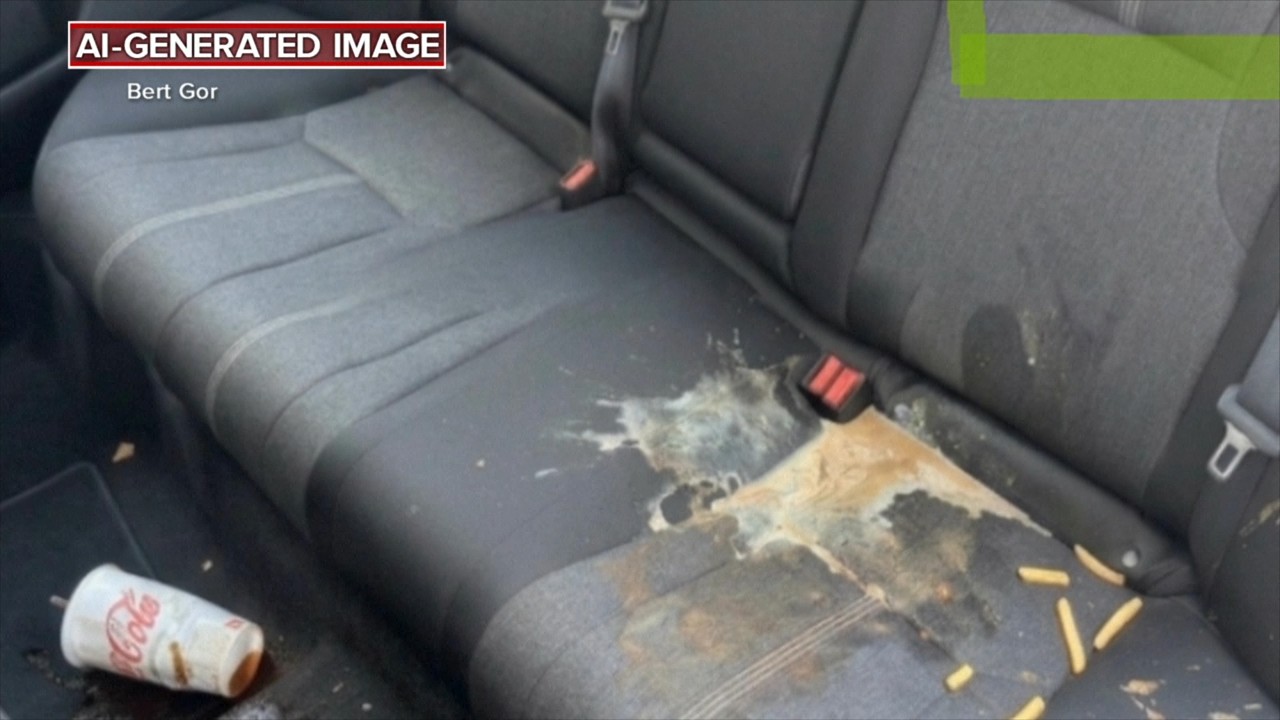
A beach trip home turned into a lesson in how to spot AI generated images. In May 2026, a Florida father named Bert Gor opened his Lyft account and found a surprise $75 damage fee. According to ABC News, the driver claimed two teenage passengers had wrecked the back seat. The driver even supplied a photo as proof. However, the photo was fake.
The scam fell apart fast. After Gor asked Lyft for evidence, his teenage daughter Ella studied the image. Then she spotted a small AI watermark in the corner. Within seconds, she knew software had produced the picture. For photographers, this story is a pointed warning.
AI image tools now reach everyone, and some people will use them to commit fraud. This article breaks down what happened, how a teenager outsmarted the scheme, and how to read a suspicious photo. More broadly, the incident sits inside the wider debate over AI and authenticity. The skills below protect you in rideshare disputes, marketplace listings, and news feeds alike.
The Lyft AI Photo Scam: Story at a Glance
Here are the verified facts of the case, confirmed through ABC News reporting.
| Detail | What Happened |
|---|---|
| Passengers | A teenager named Ella and a friend |
| The ride | A trip home from the beach on Saturday, May 16, 2026 |
| The charge | A $75 damage fee added after the ride ended |
| The “evidence” | A photo showing a drink and french fries spilled across the back seat |
| The giveaway | A visible AI logo in the bottom-right corner of the image |
| Lyft’s response | The company refunded the family and permanently removed the driver |
How One Teenager Caught the Fake AI Photo
Gor first assumed the worst. “In my mind, I’m thinking, these girls are grounded for the whole weekend,” he told Good Morning America. So he contacted Lyft customer service and asked to see the evidence. The support team then sent over the driver’s photo of the alleged mess.
Ella looked at the same picture and reached a different conclusion. A small AI watermark sat in the bottom-right corner. She recalled spotting “the AI logo” and knowing instantly the image was fake. One marker exposed the entire scheme.
The scammer had left the logo in place. A simple slip handed the family instant proof. Gor took the watermark back to Lyft, and after review, the company agreed the image was not authentic and apologized. In a statement to ABC News, a Lyft spokesperson said the company reviews damage disputes based on available information. Lyft also confirmed it refunded the family and removed the driver from the platform for good. One sharp-eyed teenager beat a scam built on synthetic media.
How to Spot AI Generated Images
The Gor family got lucky, because the fake carried an obvious logo. Most fakes will not. So reliable detection means reading the image itself, not the corner logo. These three layers are the practical core of how to spot AI generated images. Together, they expose most synthetic photos.
Check for AI Watermarks and Content Credentials
Start with the easiest signal. Notably, many AI tools stamp their output with a visible mark. Google’s Gemini image generator, for example, places a small colored sparkle logo in a corner. The Lyft scammer left it in place, and the oversight ended the dispute.
Invisible markers matter too. Google embeds a hidden signal called SynthID into its AI images. Adobe, OpenAI, and major camera brands support C2PA Content Credentials, a metadata standard showing how an image was made. The free Content Credentials Verify tool reveals this history. For a fuller breakdown of these standards, see our guide on how to tell if an image is AI generated.
One caution applies. A missing watermark never proves a photo is genuine. Scammers crop a visible logo off in seconds, and a screenshot strips C2PA metadata. Hidden signals like SynthID survive most edits, yet not every image carries one. Therefore, treat any watermark as strong evidence, and treat a clean file as inconclusive.
Read the Image Like a Photographer
Photography knowledge gives you a real edge here. AI generators still struggle with physics, and trained eyes catch the errors. Light direction is the first thing to check. In a fake, shadows often fall in conflicting directions, or a bright window throws no light onto nearby surfaces.
Reflections fail in similar ways. Mirrors, sunglasses, and glossy car interiors show reflections out of step with the scene. Next, study texture at full zoom. Fabric, hair, and food turn smeared or plastic-looking, while repeated patterns appear where none belong.
Hands and printed text remain weak spots for AI. Warped labels, melted fingers, and nonsense lettering give a fake away. Finally, check the background blur. AI often produces depth of field no real lens creates, with sharp and soft zones mixed in ways optics do not allow. These visual errors are the clearest signs of AI generated images.
Run the Photo Through Detection Tools
Software adds a useful second opinion. For instance, reverse image search through Google Lens or TinEye shows whether a picture appeared online before. If a damage photo turns up on a stock site, you have your answer. An AI detector from services like Hive or Sightengine estimates the odds an image is synthetic. However, no AI detector is perfect, so treat any score as one clue among several. For the clearest view, open the photo at full size on a desktop, since phone screens hide the texture flaws.
Why AI Photo Scams Are Spreading
This scam is not isolated. After Gor posted about the charge on a community Facebook page, several neighbors reported similar surprise fees. Moreover, the pattern reaches well beyond rideshare apps. Insurance fraud investigators have warned for years about edited and AI-generated photos turning up in false vehicle damage claims.
The reason comes down to cost and effort. A convincing fake once required hours in editing software and real skill. However, a short text prompt now produces one in seconds, often for free. Photographers have watched the fallout up close. For example, the industry has seen its own photography fraud cases making headlines. Used-gear buyers increasingly meet scammers who use staged photos as proof of damage.
What to Do If a Fake Damage Fee Hits Your Account
Speed and evidence win these disputes. Start by opening the charge in the app and requesting the supporting photo, exactly as Gor did. Then run the image through the checks above on how to spot AI generated images. Look closely for watermarks, broken lighting, and warped detail.
Build your own record too. Save the ride receipt, the trip timestamps, and any photos you took during the ride. If the platform resists, escalate politely and point to specific flaws in the evidence. For larger amounts, dispute the charge with your card issuer as well. Lyft says it reviews each dispute, and the company offered this family a refund, so steady persistence pays off.
What the Lyft Case Teaches About Spotting AI Generated Images
A teenager beat this scam for one reason. She looked closely. The fraud relied on nobody checking the photo, and a careful glance broke it apart.
Photographers hold a real advantage here. Years of studying light, lenses, and composition train the eye to sense when an image breaks the rules of the physical world. This instinct is the durable skill behind spotting AI generated images, long after any single watermark standard changes.
A visible watermark rescued the Gor family this time. The next fake might carry no logo at all. So treat every surprise photo as a claim to test, and a close look will expose most fakes.
Frequently Asked Questions
How do I identify an AI-generated image?
Work through three layers. Begin with the file itself, checking for visible AI logos and hidden Content Credentials. Move on to the photo, studying light, shadows, reflections, and texture for physics errors. Then add software, running a reverse image search and an AI detector. Together, these layers catch most fakes.
Do AI-generated images always have a watermark?
No. Many tools add a visible logo or a hidden SynthID signal, though neither is universal. A crop removes a corner logo, and SynthID only appears on images from tools built to add it. So a missing watermark never confirms a photo is real. It means you need to look harder at the image itself.
What is the best free AI image detector?
Several free options work well, including Hive Moderation, Sightengine, and the Content Credentials Verify tool. Each one estimates the odds an image is synthetic. No AI detector is fully accurate, so check more than one and pair the results with your own visual inspection.
How do you tell if a photo is AI generated?
Look for the signs of AI generated images, such as inconsistent shadows, warped text, melted fingers, and smeared textures. Backgrounds often blur in ways no real lens produces. Open the file at full size on a desktop screen, because phone displays hide the fine flaws.
Do rideshare drivers charge fake damage fees?
Most drivers are honest. Still, the Lyft case shows the risk is real. After the story spread, other riders reported similar surprise charges. Always review damage fees, request the evidence photo, and inspect it before you pay.
What should you do about a surprise rideshare damage fee?
Dispute it through the app right away and ask to see the driver’s photo. Examine the image for AI watermarks and physics errors. Save your receipts and trip details. If the platform will not help, contact your card issuer to dispute the charge.

