


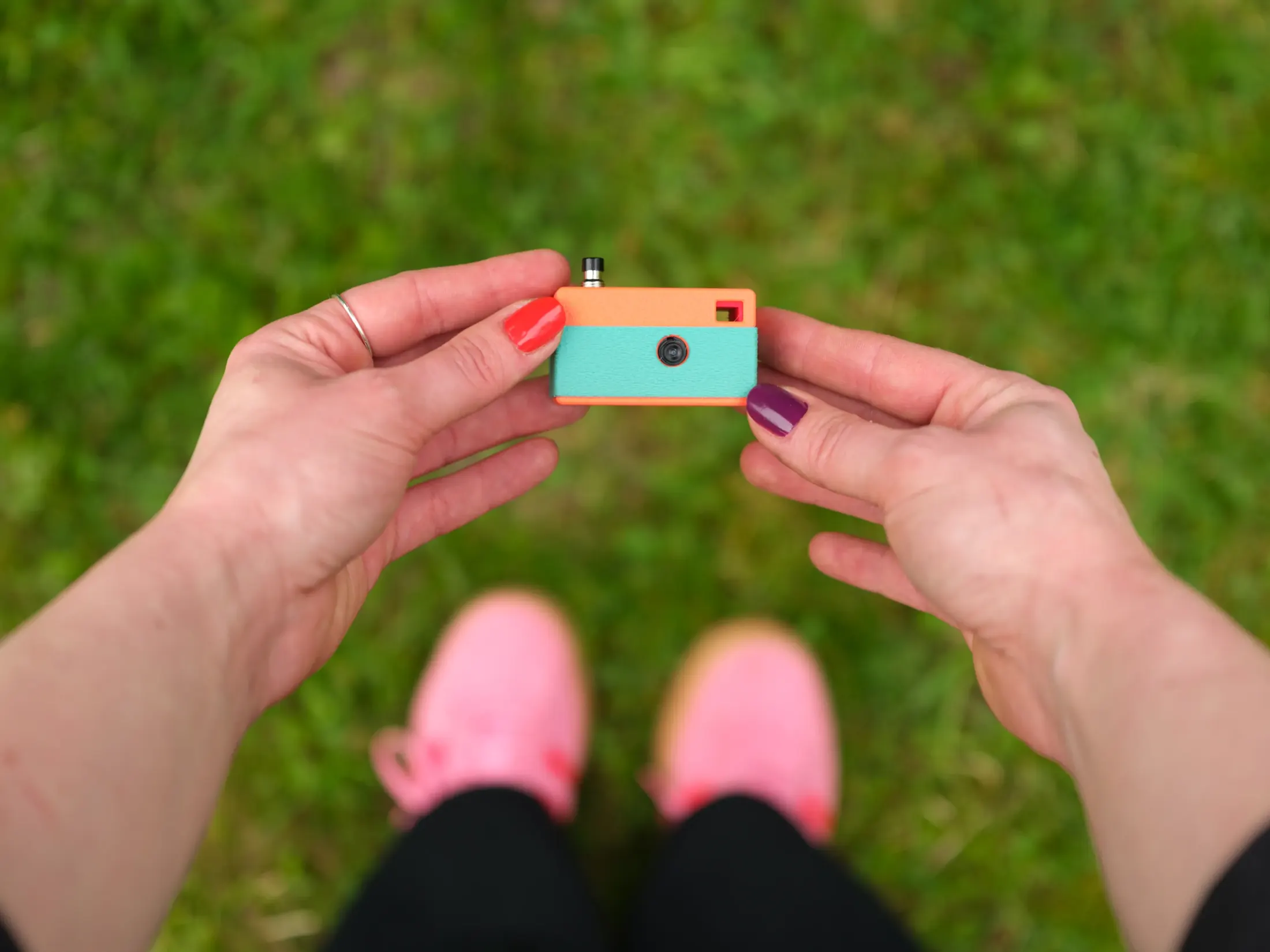
Quick Facts:
- Product: Keymera 3D printed keychain camera
- Sensor: 3-megapixel fixed camera
- Size and weight: 53 x 42 x 26 mm, 44 grams
- Build time: About 2 hours, beginner level
- Storage: microSD card
- Connectivity: Wi-Fi gallery, no app or account
- Shell designs: Rangefinder, SLR, Instant (TLR as a stretch goal)
- Price: Digital files from $10 early bird, $15 regular
- Best for: Makers who want a pocket camera they build themselves
8 min read
In This Article
- What the Keymera 3D Printed Keychain Camera Is
- Keymera Keychain Camera Specs at a Glance
- How the Keymera Works: One Button, One LED
- How You Build the 3D Printed Keychain Camera
- Three Shell Designs for Your Keymera
- Where the Keymera Campaign Stands
- Who Should Build a Keymera
- Keymera Pros and Cons
- Final Verdict
- Frequently Asked Questions
What the Keymera 3D Printed Keychain Camera Is
The Keymera is a 3D printed keychain camera you build yourself at a desk in about two hours. It lands in the middle of a keychain camera trend the Kodak Charmera started. However, the Keymera takes a different route. Instead of buying a finished gadget, you print the shell, wire four parts, and flash the firmware.
For makers and weekend tinkerers, this DIY camera ends with a working result you carry every day. The Keymera holds a 3-megapixel sensor, stores photos on a microSD card, and opens a Wi-Fi gallery on your phone. Notably, there is no app, no account, and no cloud service. As a result, you own the build, the files, and every photo you take.
Pricing stays low. Early backers pay $10 for the digital files, while regular backers pay $15. A commercial license runs $99 for early birds and $149 afterward, which lets people print and sell their own Keymeras. Because you supply the filament and the small electronic parts, your real spend depends on what you already own.
Picture a small camera asleep on your keyring. You press its single button when a moment worth keeping appears, and the Keymera saves one photo. Then it slips back to sleep. The Keymera follows the spirit of another crowdfunded compact camera, the Rewindpix, while trading raw sharpness for a calm, deliberate way to shoot.
Keymera Keychain Camera Specs at a Glance
Here are the core numbers behind the Keymera before the build details. Modest specs are the point here, since the goal is a pocket companion rather than a phone replacement.
| Specification | Details |
|---|---|
| Camera sensor | 3 megapixels, fixed |
| Dimensions | 53 x 42 x 26 mm |
| Weight | 44 grams |
| Storage | microSD card |
| Connectivity | Wi-Fi gallery, no app required |
| Power | Rechargeable battery, USB-C charging |
| Controls | Single button for shutter and gallery |
| Status light | One LED |
| Printed parts | 5 |
| Electronic components | 4 (microcontroller, battery, button, LED) |
| Firmware | Arduino IDE, editable source files |
| Shell designs | Rangefinder, SLR, Instant (TLR planned) |
| Build time | About 2 hours, beginner level |
| Price | Digital files from $10 |
How the Keymera Works: One Button, One LED

The Keymera runs on a deliberately simple loop. Most of the time the camera sleeps with its LED off, which protects the battery. A single press wakes the camera, captures one photo, and writes the file to the microSD card. Three slow flashes then confirm the shot. Afterward, the Keymera returns to sleep.
Holding the button for about 2.5 seconds opens the Wi-Fi gallery. Your phone joins the Keymera network, and the gallery loads right in your phone browser. From there, you browse the photos and download the ones you want. Because no app sits in the middle, setup takes seconds. Moreover, no account logs what you shoot or where you shoot it.
The 3-megapixel sensor sets clear expectations. Photos land lo-fi and unedited, with soft detail and honest color. Some shooters read the limited resolution as a flaw. For others, the look is the whole appeal, much like a film point-and-shoot. Either way, the Keymera asks you to slow down and pick one frame at a time.
How You Build the 3D Printed Keychain Camera

Keymera calls the build beginner friendly, and the parts list backs the claim. The camera uses five printed parts and four electronic components. Those components are a microcontroller, a battery, the button, and a status LED. In total, the wiring needs four solder joints, so a basic soldering iron covers the whole job.
The build runs in four clear steps. First, you choose a shell design and print it in the filament you like, which takes about an hour. Second, you wire the four components with those four solder joints. Third, you flash the firmware through the Arduino IDE in a single click, using editable source files. Finally, you press-fit the parts together, drop in a microSD card, and shoot.
What You Supply Yourself
The $10 or $15 price covers the digital files, not the hardware. You bring your own filament, the microcontroller, the battery, the button, the LED, and a microSD card. Each MakerWorld backer tier includes a detailed bill of materials with links to the parts. The four electronic components are inexpensive, common hobby parts, so this DIY camera stays affordable for anyone who already owns a 3D printer.
Three Shell Designs for Your Keymera

Every Keymera shares one inner frame and the same electronics. The exterior shell changes the personality. There are three designs at launch. The Rangefinder shell stays flat and low profile, built to disappear onto your keys. Its SLR sibling adds a raised top for a classic camera silhouette. Meanwhile, the Instant shell goes square and playful, made for bright filament colors.
Print any shell in any filament you own. A Bambu Lab fuzzy skin texture turns plain PLA into a printed leather finish, and every camera shows a slightly different grain. An optional 3D-printed shutter cap, a big red button, press-fits over the metal switch for a satisfying click. Because color and texture come from your slicer, no two builds look identical.
Where the Keymera Campaign Stands
The Keymera lives on Bambu Lab MakerWorld as a crowdfunding project from designer Matej Nahtigal, sold as licensed digital files through the official Keymera site. It cleared its modest $1,500 goal early in the campaign. Therefore, the stretch goals are now in play.
When funding hits $4,000, every backer gets a fourth shell inspired by twin-lens reflex cameras, complete with dual decorative lenses. At $8,000, a Keymera Portal Pro upgrade adds a richer Wi-Fi gallery with filters, brightness and contrast controls, film borders, and direct save-to-phone. Notably, every stretch goal reaches all backers, not a paid tier.
Who Should Build a Keymera
The Keymera fits a specific person. If you own a 3D printer, like the Kodak Charmera trend, and enjoy a hands-on project, this is a strong pick. Makers who follow pocketable camera news will recognize the appeal of a tiny carry camera with no screen and no menus. The build your own camera idea is the whole pitch, and the finished result stays useful long after the soldering iron cools.
This camera is not for everyone. If you want sharp, large prints or reliable low-light shots, a 3-megapixel toy will frustrate you. People who want a finished product out of the box should skip the build. For those readers, our guide to the best affordable compact cameras points to better options.
Soldering and 3D printing are real requirements, not optional extras. A first build asks for patience, a tidy desk, and a willingness to redo a joint. Still, the learning curve stays gentle next to most electronics kits. Few DIY camera builds end with something this pocketable and this personal.
Keymera Pros and Cons
Weigh these strengths and trade-offs before you back the project.
Pros
- Beginner-friendly build, about 2 hours from print to first photo
- Only 4 solder joints and 4 electronic components
- No app, no account, and no cloud, so your photos stay private
- Three shell designs, printable in any filament color
- Tiny and light at 44 grams and 53 mm wide
- Low entry price, with digital files from $10
- USB-C charging uses the same cable as most phones
- Editable source files for shooters who like to tinker
Cons
- The 3-megapixel sensor delivers lo-fi image quality
- You need a 3D printer or a print service
- The build asks for soldering and basic wiring skills
- You buy the electronic parts and filament separately
- As a crowdfunding project, timelines carry normal risk
- No screen means no framing or instant review
Final Verdict

The Keymera earns attention from makers who want a camera with a story behind every photo. Its biggest strength is the build itself. You turn a spool of filament and a handful of parts into a working camera in an afternoon, and the result clips onto your keys. For hobbyists drawn to a build your own camera weekend, the value here runs high.
However, the trade-offs are honest. A 3-megapixel sensor will not satisfy anyone chasing detail, while the lack of a screen removes instant review. In addition, soldering, printing, and parts sourcing add friction a finished camera avoids. Consequently, readers who want point-and-shoot ease should look elsewhere.
On value, the Keymera offers a strong deal for the right buyer. Digital files from $10 turn a printer and a parts bin into a real camera. Because every stretch goal reaches all backers, early support also adds future shells and gallery features at no extra cost. For makers, the spend is easy to justify.
Final recommendation: back the Keymera if you own a 3D printer and want a hands-on project with a keepsake at the end. Treat the build as one of those fun beginner photography projects worth a free weekend. If you would rather buy a finished camera, our roundup of the best cameras for beginners points to easier options. For the maker crowd, though, the Keymera is one of the more charming camera projects we have seen this year. You back the project through the official Keymera site.
Frequently Asked Questions
What is the Keymera keychain camera?
The Keymera is a tiny keychain camera you assemble at home. It uses a 3-megapixel sensor, saves photos to a microSD card, and opens a Wi-Fi gallery on your phone. You buy licensed digital files, print the shell, and wire four small parts.
How long does it take to build the Keymera?
Keymera estimates about two hours for a total beginner. Printing the shell takes roughly an hour, while wiring, flashing the firmware, and final assembly fill the rest. Experienced makers will move faster.
Do you need soldering skills to build the Keymera?
You need basic soldering, though the bar stays low. The whole camera uses four solder joints and a simple soldering iron. For a first project, the wiring is forgiving, and the editable source files help if you want to learn more.
How much does the Keymera keychain camera cost?
The Keymera digital files start at $10 for early backers and $15 for regular backers. A commercial license costs $99 or $149. Remember, you also buy filament and the electronic parts yourself.
Does the Keymera need an app or account?
No. The Keymera opens its photo gallery over Wi-Fi directly in your phone browser. There is no app to install, no account to create, and no cloud service holding your images.
How is the Keymera different from the Kodak Charmera?
The Kodak Charmera is a finished keychain camera you buy in a blind box. In contrast, the Keymera is a build-it-yourself project sold as 3D-print files. Both deliver small, fun, low-resolution photos, but only the Keymera lets you print, customize, and repair the camera yourself.

