


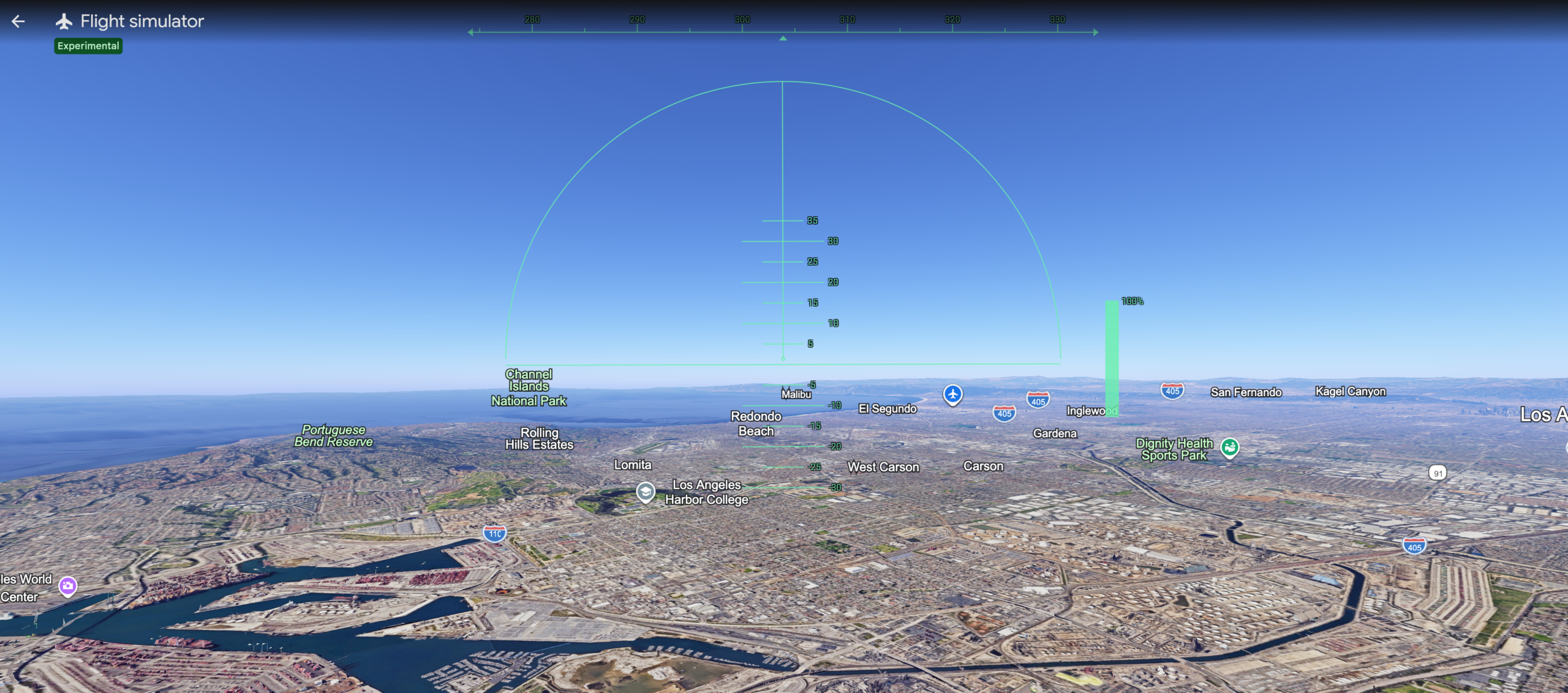
Quick Verdict: The Google Earth flight simulator now runs free in any web browser, with no download required. You reach it through Explore Earth, then the Tools menu. As a trained commercial pilot who grew up on Microsoft Flight Simulator, I found the arrow-key controls loose and the physics simple, yet flying real aerial imagery down the California coast was a blast. Treat it as a fun way to explore the planet, not a training tool.
Last updated: June 2026 | 7 min read
In This Article
A Pilot’s First Impression

The Google Earth flight simulator landed on the web this week, and it pulled me straight back to my childhood. Google rolled the feature out on Friday to users worldwide, and the headline detail is access. You fly entirely in a web browser, with no app to install. I trained as a commercial airline pilot, and I grew up logging hours on Microsoft Flight Simulator at the family PC. So between editing the Joneses’ wedding photos, I opened a browser tab and took Google’s version up for a spin. Watching Google bolt a cockpit onto its global imagery is a lot of fun.
The mode itself is not new. Google Earth has hidden a flight simulator inside its desktop app for years, but reaching it meant downloading the software first. This browser version changes the math. Now anyone with a keyboard, a mouse, and a Chrome tab flies for free.
Set your expectations before takeoff, though. Google built this for casual exploration, not aerodynamic training, and the difference shows within seconds. Still, for a photographer or an aviation fan, the appeal is obvious. You fly around Google Earth over real aerial photography of the entire planet, the same imagery you would otherwise study from a camera drone hundreds of feet up.
Google Earth Flight Simulator at a Glance
Here are the core details before the full walkthrough. The table below covers access, controls, and the limits Google set on the experience.
| Detail | Information |
|---|---|
| Feature | Flight simulator mode inside Google Earth |
| Platform | Web browser only (Chrome, Edge, and other modern browsers) |
| Cost | Free |
| Released | June 2026, rolled out worldwide |
| Access path | Explore Earth, then Tools, then Flight Simulator |
| Steering | Arrow keys or mouse |
| Throttle | Page Up and Page Down, or the on-screen power gauge |
| Flight physics | Simplified, built for casual exploration |
| Crash recovery | One-click restart at a safe altitude |
| Best for | Exploring real aerial imagery for fun, not flight training |
How to Start Google Earth’s Flight Simulator
Starting the simulator takes about four clicks. First, open Google Earth in your browser at earth.google.com. Next, click Explore Earth on the home screen. Then open the Tools menu in the top bar, scroll down, and select Flight Simulator. From there, you drop into the cockpit anywhere on the planet.
Watch the clip below from Google for a quick look before you fly. One note from experience: the simulator runs on the web version only, so the desktop and mobile apps will not show the option.
Google Earth Flight Simulator Controls
The controls take some getting used to. You fly the plane with the four arrow keys, and you set engine speed with Page Up and Page Down. If your keyboard lacks those two keys, click the power gauge on the right side of the screen instead. Clicking inside the window toggles mouse steering, which some pilots prefer for finer banking.
| Action | Keyboard control |
|---|---|
| Increase thrust | Page Up, or click the on-screen power gauge |
| Decrease thrust | Page Down |
| Pitch the nose up or down | Up and Down arrows |
| Roll and bank left | Left arrow |
| Roll and bank right | Right arrow |
| Toggle mouse steering | Click inside the simulation |
| Restart after a crash | Click “You crashed! Restart” |
| Exit the simulator | Click the back arrow, top-left |
Google’s own developer documentation confirms these mappings, and it admits the obvious. Other users have complained the plane is tricky to steer, and I agree. Expect some trial and error, and expect a barrel roll or two before you settle into level flight.
My Test Ride Down the California Coast
I took the plane out along the coast of California for my first flight. Lining up over the Pacific, I nudged the throttle with Page Up and banked south with the arrow keys. The aerial imagery streamed in as I flew, with the coastline and the water rendering in real time below the wings.
Handling felt loose, and small inputs sent the nose wandering. At one point, I rolled too far and ended up fully inverted over the shoreline. Rather than recover right away, I took a page out of Maverick’s playbook in Top Gun and held the inverted line long enough for a screenshot.

When I finally clipped the terrain, the simulator paused and offered a one-click restart. Seconds later, I was back in the air at a safe altitude. The loop of fly, crash, restart, and fly again is forgiving, and it kept the session fun rather than frustrating.
What It Lacks Compared to Real Flight Simulators
Compared to a refined flight simulator, Google Earth leaves out almost everything under the hood. Microsoft Flight Simulator 2024 models weather, air traffic, fuel, engine systems, and a full instrument panel. Google gives you a horizon line, a power gauge, and simplified physics. There is no realistic stall behavior, no wind, and no cockpit instruments to scan.
The flight model is the biggest gap. Real simulators reward rudder coordination and trim, while Google’s plane banks and pitches with arcade-style ease. For a pilot, the missing rudder control and the loose response feel strange at first. A curious photographer will not miss any of it.
What Google does offer is its imagery, and the imagery is the whole point. You fly over actual aerial and satellite photography of the planet, not a modeled world. Buzzing low over a coastline you know well, or over your own town, is a different kind of fun from a study-grade sim. It is closer to the view you chase in drone photography than to a checkride.
One quirk is worth knowing before you explore. Google flags a known issue near regions below sea level, such as Badwater Basin in Death Valley, where the terrain occasionally flickers or clips as you fly close to the ground.
Pros and Cons
Pros
- Free, and it runs in a web browser with no download
- Reaches the cockpit in about four clicks
- Flies over real aerial imagery of the entire planet
- One-click restart after every crash
- Works with arrow keys or a mouse
Cons
- Loose, arcade-style handling
- Simplified physics with no stalls, wind, or fuel
- No rudder control or cockpit instruments
- No aircraft choice and no weather
- Occasional terrain flicker below sea level
Final Thoughts

The Google Earth flight simulator is a toy, and I mean it as a compliment. For free, inside a browser, you fly anywhere over a planet built from real photography. As a pilot and a lifelong flight-sim player, I had a grin on my face the whole session.
Set the right expectation, though. If you want realistic systems, weather, and a flight model worth training on, stay with Microsoft Flight Simulator or X-Plane. Google’s version skips all of it by design, and the loose controls make the point within the first minute.
For everyone else, the appeal is the access. Open a tab, fly around Google Earth, find your coastline, and roll. I will keep mine bookmarked for the next time I want to roll inverted over the California coast for a photo.
Frequently Asked Questions
How do you access the Google Earth flight simulator?
Open Google Earth in a web browser at earth.google.com, then click Explore Earth. Next, open the Tools menu in the top bar and select Flight Simulator. The whole path takes about four clicks, and it works only on the web version of Google Earth.
Is the simulator free?
Yes. The feature is free for everyone worldwide, and it needs no app or paid account. You only need a modern web browser, a keyboard, and a mouse to fly.
What are the controls?
You steer with the four arrow keys and set engine speed with Page Up and Page Down. If your keyboard lacks those keys, click the power gauge on screen. Clicking inside the window toggles mouse steering, and a crash brings up a one-click restart.
Is it as good as Microsoft Flight Simulator?
No, and Google never aimed for it. Microsoft Flight Simulator models weather, systems, and realistic flight physics for training-grade detail. Google’s version trades all of it for simple, free access to real aerial imagery of the planet.
Does it work on mobile?
No. The flight simulator runs on the web version of Google Earth only, so it needs a desktop or laptop browser. On phones and tablets, the Tools menu does not show the Flight Simulator option.
What happens when your plane crashes?
The simulation pauses and shows a “You crashed! Restart” prompt. Click it, and the plane returns to a safe altitude and position within seconds. The quick reset makes the fly, crash, and restart loop forgiving for new pilots.

