



Most photographers spend years improving their gear and editing skills while judging every image on a screen. Phones and monitors look clean and bright, and almost any decent frame looks good when backlit. That viewing method feels efficient, yet it hides problems that slow real progress.
The first time you review your work as a paper print, your perspective shifts. Detail, tone, and color behave differently. Small focus errors show up. Contrast choices feel stronger or weaker than expected. Composition either holds attention or falls apart. Print-based review gives you honest feedback.
A consistent photo printing workflow turns that feedback into a skill-building system. Instead of guessing which edits work, you verify them in print. Over time, your exposure control tightens, your color grading improves, and your compositions grow more disciplined. Let’s see how that process works in practice!
Table of Contents
- Printing Exposes Technical Mistakes Fast
- Exposure and Dynamic Range Improve with a Photo Printing Workflow
- Color Accuracy Improves with a Photo Printing Workflow
- Paper Choice Builds Creative Intent
- Printing Strengthens Composition Discipline
- Editing Skills Improve Through a Photo Printing Workflow
- Printed Reviews Improve Portfolio Judgment
- Using Artbeat Studios Prints in Your Photo Printing Workflow
- A Practical Photo Printing Workflow You Will Reuse
- FAQ
Printing Exposes Technical Mistakes Fast
Screen-based viewing flatters your images. Bright displays smooth transitions and hide fine defects. Noise looks lighter. Focus errors look smaller. Edge halos from sharpening often go unnoticed. A paper print removes those visual cushions.
When you hold a print, you judge real detail instead of glowing pixels. Texture either looks natural or artificial. Fine edges either look crisp or brittle. That direct feedback helps you tune sharpening and noise control choices with more precision.
Print-review also changes how you judge capture quality. Slight motion blur or missed focus that seemed acceptable on screen often fails on paper. After a few rounds inside a photo printing workflow, you start shooting with tighter discipline because you know the print will tell the truth.
This shift alone improves your keeper rate. You stop accepting “good enough on screen” and start aiming for “holds up in print.”
Exposure and Dynamic Range Improve with a Photo Printing Workflow

Photo by Andrew Angelov via Shutterstock
Exposure judgment often drifts when you rely on bright screens. Many displays run hot, which makes darker images appear balanced. Then the print arrives and looks heavy and flat. A structured photo printing workflow corrects that pattern.
Paper prints compress tonal range compared to screens. That difference forces better highlight and shadow management. You protect bright areas more carefully and open shadows with more restraint.
Histogram-reading grows more practical when tied to print results. Instead of editing toward a pleasing preview, you edit toward stable tonal placement that survives print-output.
Small proof-prints work well here. You adjust exposure, print, and compare versions side- by-side. That repeatable loop builds strong tonal judgment faster than screen-only editing.
Color Accuracy Improves with a Photo Printing Workflow

Photo by New Africa via Shutterstock
Color varies across devices. Two screens rarely match, and phone displays often boost saturation. Without a print reference, your color grading drifts over time. A photo printing workflow anchors your decisions to physical output.
Portrait work shows this effect clearly. Skin-tones that look fine on screen often print too warm or slightly green. When you review printed portraits, those shifts become obvious and correctable.
Monitor-calibration plus print review creates tighter control. You edit, print, compare, and adjust. Each cycle reduces guesswork and builds repeatable color results.
Paper surface also affects color perception. Glossy stock increases punch. Fine-art stock softens transitions. Seeing the same image across surfaces strengthens your color-intent decisions.
Paper Choice Builds Creative Intent
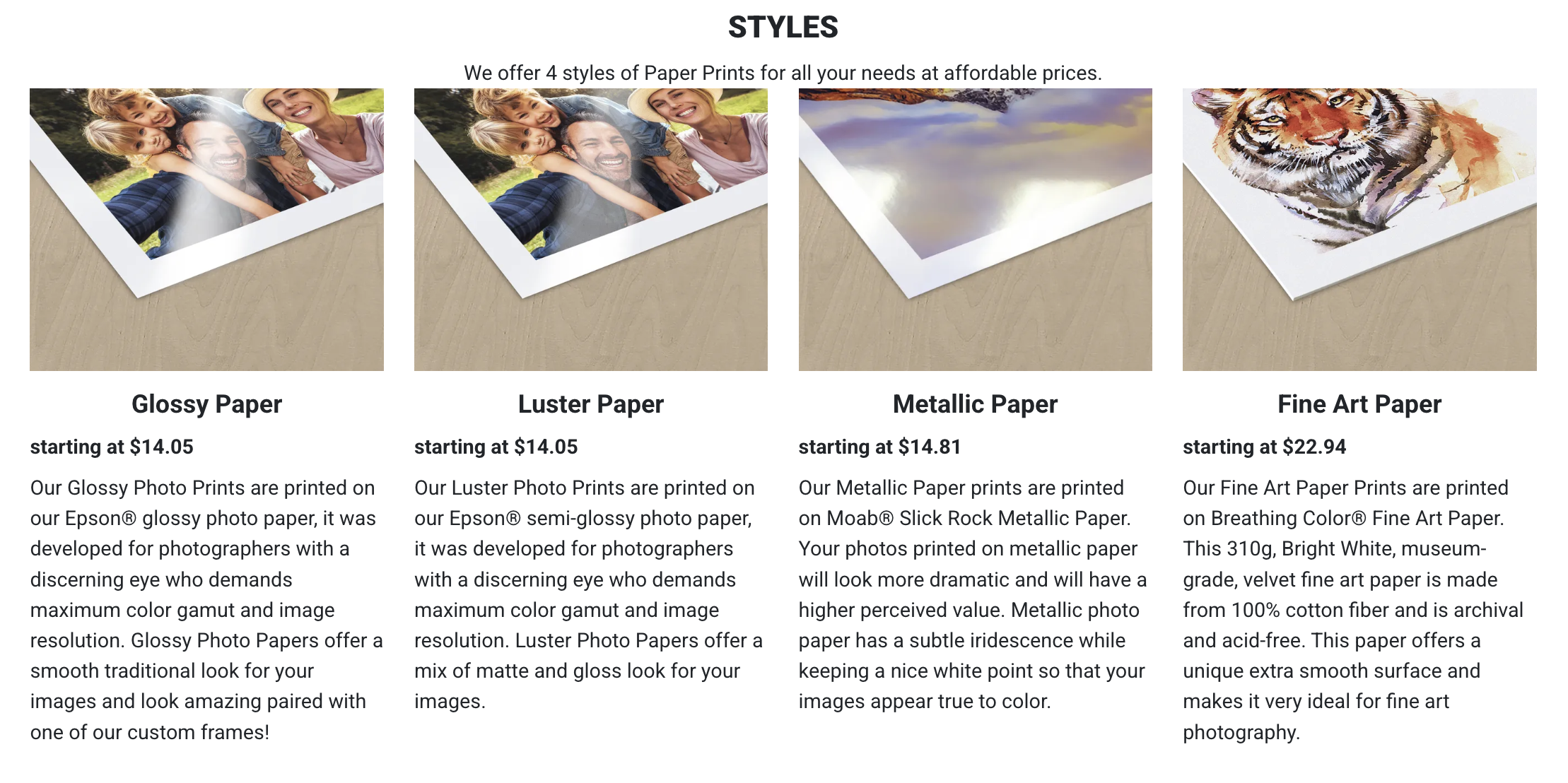
Paper choice affects mood and visual weight. A strong photo printing workflow treats paper as part of the creative decision, not a final checkbox.
Glossy paper supports high-contrast and color-rich scenes. Luster paper provides balanced sheen with lower glare. Metallic paper adds depth and intensity. Fine-art cotton paper supports subtle tonal work.
When you test images across paper types, you see how presentation changes perception. A dramatic portrait gains force on metallic stock. A quiet landscape feels more natural on fine-art paper.
This practice strengthens intent. You start editing with the final paper-surface in mind, which leads to more cohesive results.
Printing Strengthens Composition Discipline

Photo by Andrey Sayfutdinov via Shutterstock
Composition reads differently in print. Screen-based viewing encourages quick scrolling and loose framing tolerance. A physical print slows you down and adds a hard frame boundary.
Edge distractions become more visible. Bright corners, cut-off elements, and awkward negative space stand out right away. A photo printing workflow trains border-awareness.
Aspect-ratio choices also gain importance. A crop that feels fine on a phone may feel cramped as a print. Reviewing printed versions builds better framing instincts.
Printed contact sheets help you spot repeated habits. You see how you center subjects, how you handle space, and where you rush framing.
Editing Skills Improve Through a Photo Printing Workflow

Photo by PeopleImages via Shutterstock
Paper prints respond poorly to heavy-handed edits. Strong clarity, aggressive saturation, and extreme noise reduction create visible artifacts. A photo printing workflow exposes those issues quickly.
Print comparisons make editing decisions easier. Two versions on paper reveal contrast and color differences faster than screen toggles.
This method encourages smaller, controlled adjustments. You edit with intent, print, and verify. Your style becomes cleaner and more consistent.
Keeping note-marked proof-prints adds value. Written feedback on the print guides your next edit pass and builds editing discipline.
Printed Reviews Improve Portfolio Judgment

Photo by Meteoritka via Shutterstock
Portfolio selection also improves when you step away from endless scrolling. Table-top print-review changes how you judge impact and consistency.
Strong images hold attention when printed. Weak ones lose presence. That contrast helps you cut more effectively.
A photo printing workflow supports sequence-testing as well. You arrange prints and adjust the order until the story flow feels right.
Regular print-based portfolio reviews show your progress across months and years. Growth becomes visible and measurable.
Using Artbeat Studios Prints in Your Photo Printing Workflow

Consistent lab output supports reliable print review. A photo printing workflow works best when paper and color response stay predictable. Artbeat Studios’ paper prints provide several useful options for this process.
Their glossy and luster papers work well for color and sharpness checks. Metallic paper helps evaluate contrast and highlight behavior. Fine-art paper helps judge subtle tonal transitions.
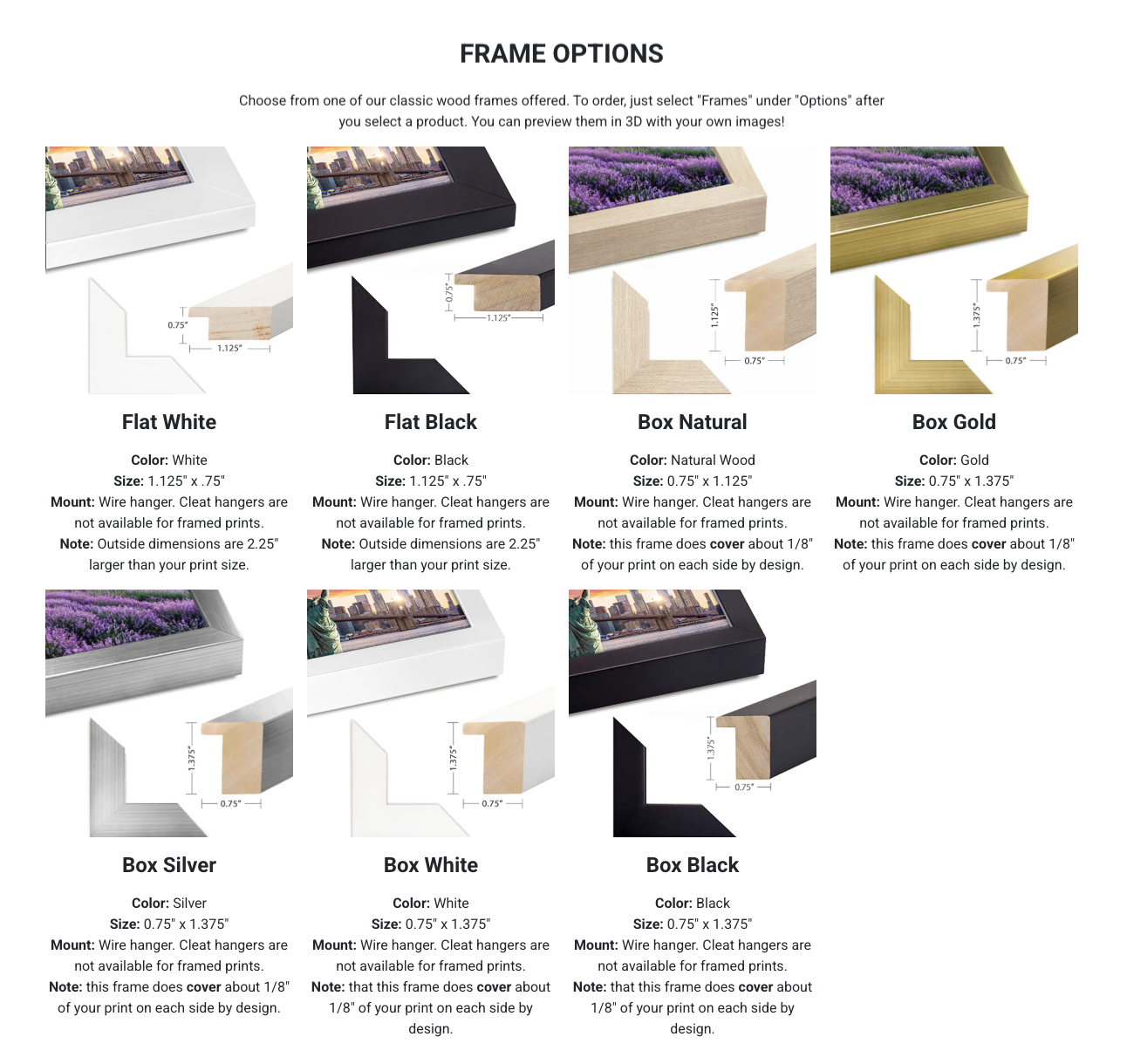
Frame and mat options also support presentation testing. Mat width and frame color change how viewers perceive subject weight and balance.
Start with small-sized test prints from Artbeat Studios, evaluate results, then move to larger prints after your edit passes print review.
A Practical Photo Printing Workflow You Will Reuse

A repeatable system drives steady improvement. Select your best recent images each month and prepare them with careful exposure and color work.
Create small proof-prints and review them under neutral light. Mark exposure, color, and composition issues directly on the paper.
Return to your editor, apply corrections, and print again. Compare versions side by side and keep the stronger result. This repeatable photo printing workflow turns print feedback into measurable skill growth.
FAQ
How often should I use a photo printing workflow?
Monthly print-review cycles produce steady improvement without high cost or time pressure.
What print size works best for review?
Small and medium proof-prints reveal most exposure, color, and sharpness issues.
Do I need expensive paper for practice prints?
Proof-level paper works well for skill review. Premium paper fits final evaluation and display testing.
Does print review help new photographers?
Yes. Print-based feedback exposes focus, exposure, and color problems faster than screen-only review.
Should I keep my test prints?
Yes. Marked proof-prints create a progress record and guide future shooting and editing decisions.
Heads up: Clicking on our affiliate links and exploring our sponsored content helps us at no extra cost to you, and we only recommend gear we’re absolutely crazy about!
Hero photo by DukiPh via Shutterstock

